Claude in a Box: How We Built Grep Using the Claude Agents SDK
We built a harness called 'Claude in a Box' to run production agents at scale. Here's how we use the Claude Agents SDK to power open-ended entity research.

We just launched a Research Preview of Grep. Try it with access code GREPIT! Here's how we built it.
The Journey Back to Agents
We built Parcha initially as a React agent using Claude 1. It was too early. Agents weren't ready for production, particularly in a compliance setting where following instructions precisely matters. The reliability just wasn't there.
So we moved into putting agents in a chain. Essentially, we went back to building workflows, like most people in the industry using Celery and Temporal. We focused on what we could control: the accuracy, reliability, and performance of the AI tools themselves.
When Anthropic launched the Claude Agents SDK, we started exploring going back to being more agentic. (We've been building with Claude Code since the early days.) The best way to do that while still serving customers in production was to reimagine what Parcha does best: in-depth research for entities. Make it as open-ended as possible to enable any use case.
That's how we built Grep.
What is Grep?
Grep is an open, comprehensive way of researching businesses and individuals. You enter the name of a company or its website, and Grep goes on to find all available information using:
- Open intelligence via web search (using Parallel)
- Proprietary data sources via MCP servers
Then you can ask anything about the company:
- What is the MCC category or industry classification?
- Is there any adverse media about them?
- Any sanctions?
- What is the revenue estimate?
- Who are the business owners?
- Who are the key employees?
- Was there any key differentiation in the market?
Anything. The question is truly open-ended.
How Grep Handles Questions
When you ask Grep something, it does one of two things:
1. We have expertise in the topic
This expertise was built using Parcha's 3 years of battle-tested AI workflows. We load this expertise as skills, and in conjunction with tools and MCPs, we perform the research the user asks for. These are the cases where we know exactly how to get the answer right.
2. We don't have that expertise
When we don't have specialized knowledge for a question, we rely on a base set of skills that enable deep research on any business or individual. These include particular search strategies for needle-in-haystack queries, map-reduce approaches to optimize for recall when finding adverse media or news about a person, and other proven patterns. We also rely on Claude's thinking and research capabilities in those cases.
Once a user is comfortable with their custom checks, we convert these into templates and skills so they can reuse them later.
Why the Claude Agents SDK Works Here
A few things that make using the Agents SDK really powerful for Grep:
1. Robustness
Being able to ask whatever we want. The open-ended nature of questions is now a feature, not a liability.
2. Skills: Packaging Our Expertise
This is the big one. We've spent 3 years building battle-tested AI workflows for compliance and research. With skills, we can package all of that expertise and provide it as context to the agent. (Anthropic has a great deep dive on how they built skills.)
We can build skills from:
- Our codebase and existing implementations
- Our governance and documentation
- The things we understand really well and have validated in production
Skills can even build other skills. The agent gets the exact methodology we've proven works. Not generic instructions, but specific criteria extracted from real compliance workflows.
3. Beyond Markdown
Something that's bothered us a lot about in-depth research products: they just output Markdown. But we're on the web. There's a lot of stuff we can do on the web.
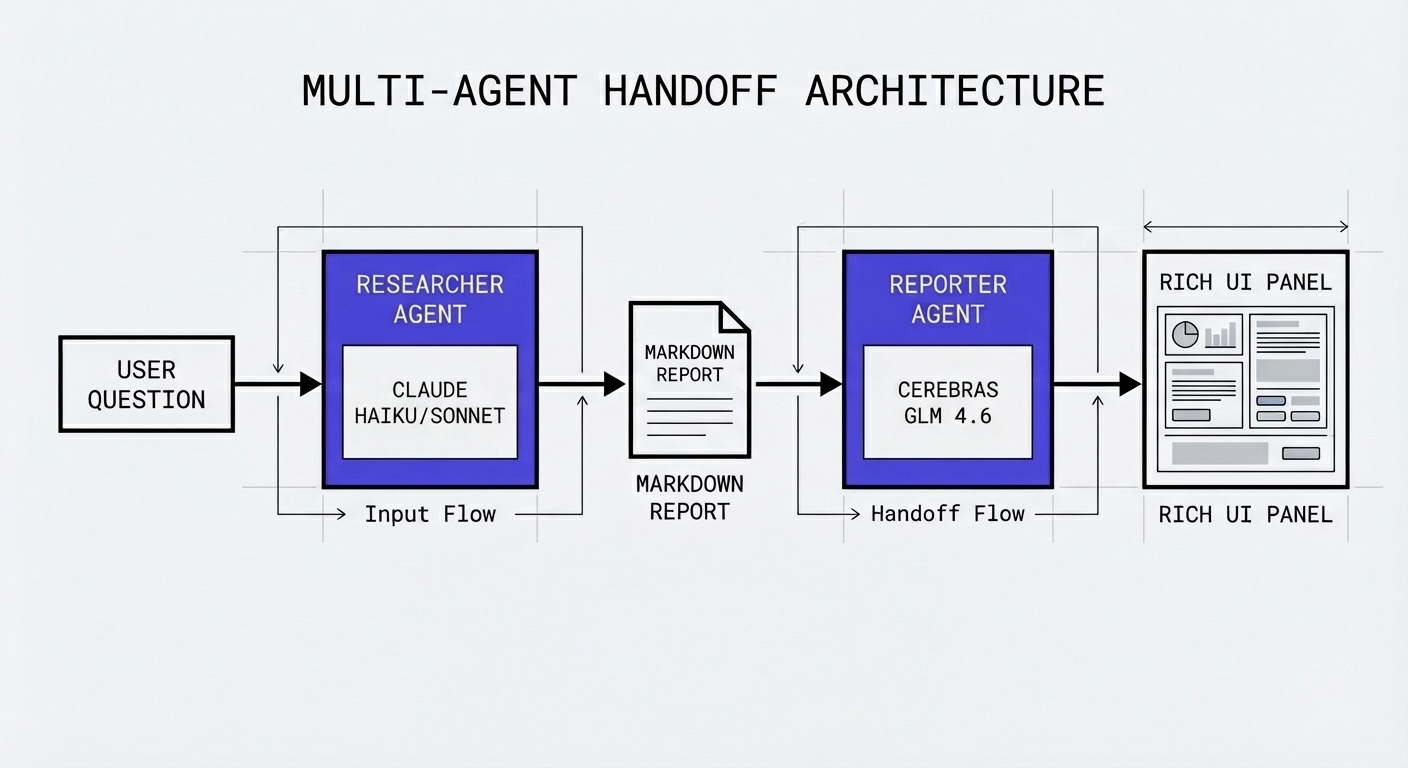
To ensure that agent outputs look good and useful, we separated concerns using a multi-agent architecture:
- Researcher Agent: Performs the research and outputs structured data
- Reporter Agent: Creates UIs on-the-fly, enabling users to see things in a rich way while keeping it consistent with our design system and the reporting guidelines we've established for each skill
This separation means the research quality isn't compromised by presentation concerns, and the presentation isn't limited by research output formats.
Technical Architecture
The Complete User Flow
When a user searches for "Tesla" in Grep, here's what happens:
- Disambiguation (~1-3s): Parallel search + Cerebras GLM 4.6 identifies the company or asks for clarification
- Web Presence Research (~60-90s): Claude Haiku/Sonnet builds a complete business profile
- Follow-Up Questions (~30-60s each): User asks questions, each forks from the web presence session
- Response Parsing (~1-2s): Cerebras GLM 4.6 extracts JSON payload + Handlebars templates
- UI Rendering: Handlebars templates render interactive dashboards
The key insight: each follow-up question gets its own isolated "box" with exactly the skills, tools, and MCP servers it needs. No more, no less.
How the Claude Agents SDK Works
The Claude Agents SDK wraps the CLI used for Claude Code. You configure it with:
- allowed_tools: Whitelist of tools Claude can use
- disallowed_tools: Tools to disable (we use Parallel Search and Fetch + Browserbase instead of native tools for more configuration and structured outputs)
- mcp_servers: HTTP, subprocess, or in-process MCP servers
- cwd: The current working directory where Claude operates
- system_prompt: Agent-specific instructions
- Other settings: Model selection, permission modes, etc.
The Request Flow
FastAPI → Redis Queue → Celery Worker → Claude in a Box → GCS + PostgreSQL → React Frontend
Each request goes through:
- Authentication + rate limiting
- Job Creation in PostgreSQL with research result records
- Task Enqueuing (Celery or Temporal)
- Worker Execution with isolated workspace
- Session Storage to GCS for fault tolerance
- SSE Streaming back to the React frontend
Claude in a Box: The Harness
Here's the thing: Claude Code relies on the filesystem for skills and transcripts. We built "Claude in a Box", a harness that creates isolated agent environments.
AgentHarnessConfig is the "box specification":
AgentHarnessConfig:
  cwd_type: "uuid"                    # Isolated /tmp/agent-workspaces/{uuid}/
  skills_to_include: ["website-trust-verification", "ui-design-system", ...]
  allowed_tools: ["mcp__parallel__web_search", "mcp__parcha__scraper", ...]
  disallowed_tools: ["WebSearch", "Edit", "Bash"]
  mcp_servers: {parallel: {...}}
  custom_tools: [parcha_scraper, take_screenshot, google_places_search]
  cleanup_on_complete: true
When a user asks "Is this website legitimate and trustworthy?", we:
- Create isolated workspace:
/tmp/agent-workspaces/f8a2b3c4/ - Copy only needed skills: From 29 total skills, we copy just 4 (website-trust-verification + 3 UI skills)
- Configure MCP servers: Parallel AI for web search, custom Parcha tools for scraping and screenshots
- Set tool permissions: Allow trust verification tools, disable others
- Run the session: Claude executes with full isolation
- Cleanup: Delete the workspace after completion
Why this matters: Loading the full skills directory would exhaust the context window. Selective loading helps keep context lean, and also helps the agent recognize which skill to use for a task. In our experiments, Claude would get confused when presented with too many options.
The Skills System
We have dozens of specialized skills covering:
- Compliance: PEP screening, sanctions, adverse media
- Research: Revenue estimation, financial data, SEC filings
- UI Generation: Design system, panel classification, React component builder
Each skill is a folder with detailed methodology. Take website trust verification as an example:
.claude/skills/website-trust-verification/
  ├── SKILL.md                # Main skill (443 lines)
  └── references/
      ├── trust_signals.md    # 30+ trust signals with weights
      ├── red_flags.md        # 25+ red flags by severity
      └── verification_workflow.md
What's in the skill? A three-stage workflow:
Stage 1: Gather Website Data
- Extract website URL from context
- Research domain establishment (WHOIS, traffic history, Web Archive)
- Scrape website content for contact info, policies, structure
- Check link integrity by testing internal pages
Stage 2: Evaluate Trust Signals (30+ signals with weights)
| Signal Category | What We Check | Weight |
|---|---|---|
| Domain Establishment | Age > 2 years, WHOIS transparency, Web Archive presence | HIGH |
| Security | HTTPS enabled, valid SSL certificate | HIGH |
| Content Quality | Professional design, about page, contact info | HIGH |
| Link Integrity | Internal links work, no 404s, policies accessible | HIGH |
| Third-Party Verification | Google Business listing, reviews on Yelp/Trustpilot | HIGH |
| Policy Presence | Privacy policy, terms of service | MEDIUM |
Stage 3: Red Flag Detection (25+ red flags by severity)
| Severity | Red Flag | Example |
|---|---|---|
| CRITICAL | Domain mimicking | amaz0n.com, paypa1.com |
| CRITICAL | No HTTPS | Site only accessible via HTTP |
| CRITICAL | No contact info | No email, phone, or address anywhere |
| HIGH | Recently registered | Domain < 6 months old |
| HIGH | Placeholder content | Lorem ipsum, "coming soon" |
| MEDIUM | Suspicious TLD | .tk, .top, .click, .gq |
| MEDIUM | Generic email | Using gmail.com for business contact |
Trust Level Calculation:
- HIGH (80-100%): Domain > 2 years, all links working, complete contact info, no red flags
- MEDIUM (50-79%): Domain 6 months - 2 years, some broken links, 1-2 minor red flags
- LOW (0-49%): Domain < 6 months, multiple broken links, critical red flags detected
Skills contain production-validated criteria extracted from FTC fraud prevention guidelines, BBB scam identification resources, and 3 years of our own compliance work. When Claude loads a skill, it gets the exact methodology we've battle-tested.
MCP Tool Architecture
We use three types of tools:
1. External MCP Servers (HTTP):
mcp__parallel__web_search- Parallel AI for web searchmcp__financial_datasets__getIncomeStatement- SEC filingsmcp__browserbase__navigate- Browser automation
2. Custom Parcha Tools (for example):
mcp__parcha_tools__google_places_searchmcp__parcha_tools__pdl_company_enrichmentmcp__parcha_tools__jurisdiction_search
3. Native Claude Tools (disabled by default):
- WebSearch, WebFetch - We use Parallel + Browserbase for more configuration and structured outputs
- Edit, Bash - No file editing in research

Distributed Execution with Celery
Unlike Parcha, where we orchestrate multiple specialized worker types, Grep uses fat workers with limited concurrency. Most of the "orchestration" happens inside the Claude Code CLI itself. The agent decides what to do next, which tools to call, what to do concurrently, when to stop.
This simplifies our infrastructure significantly. Autoscaling becomes straightforward: KEDA watches the Celery queue depth and active task count, spinning up workers as needed. No complex routing logic, no task-specific workers. We run all of this on Northflank, which handles the container orchestration and made standing up this infrastructure surprisingly painless.
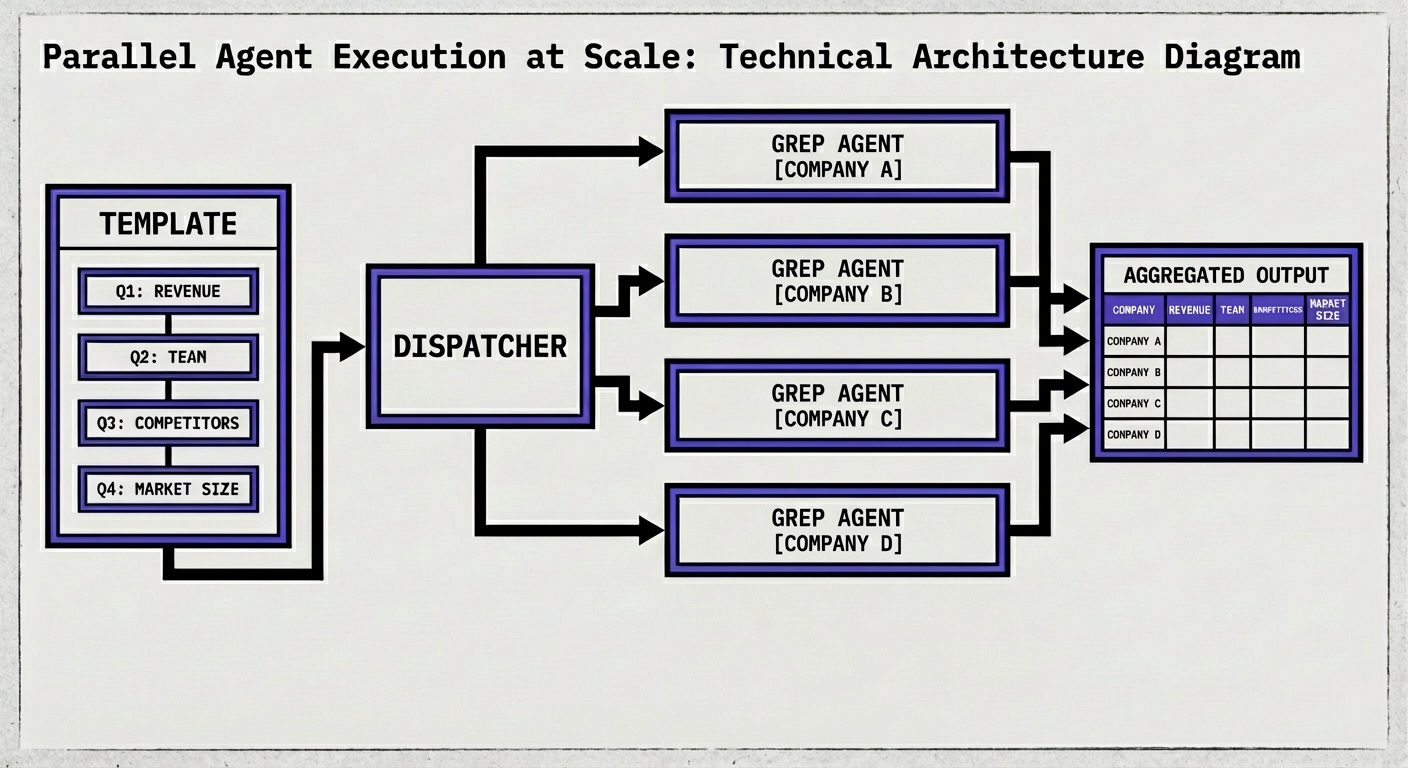
For template workflows, we use Celery canvas composition:
chain(
  execute_template_web_presence,      # Step 1: Sequential
  group(*follow_up_tasks),            # Steps 2-N: Parallel
  finalize_template_workflow          # Final: Cleanup
)
Web presence runs first, then all follow-ups fork from the same session and run in parallel.
Session Persistence & Fault Tolerance
Sessions are stored as .jsonl files. The problem: if a worker dies, the file is gone. Our solution:
- Save to GCS: After execution, upload
claude_sessions/{session_id}.jsonl - Track in DB: Store
claude_session_idin research results - Restore on recovery: New worker downloads from GCS, Claude resumes from checkpoint
Fork vs Resume
When a user asks a follow-up question:
- Fork: Creates new branch from web presence session. Each follow-up gets its own branch.
- Resume: Continues same conversation (for edits/continuations).
This enables:
- Multiple parallel follow-ups from same starting point
- Edit and retry without losing context
- Full conversation history preserved
The Two-Agent Handoff
The Researcher Agent (Claude Haiku/Sonnet) outputs markdown + structured JSON. Then we hand off to a fast agent for UI generation:
Claude Haiku/Sonnet (Research) → Reporter Agent (Cerebras GLM 4.6) → JSON + Handlebars → Frontend (Render)
The parser extracts:
json-payloadblocks → Structured datahandlebars-templateblocks → UI templates
For questions where we have expertise, we use skill-specific Handlebars templates to ensure consistent display across cases. The frontend dynamically renders these templates with the JSON payload, using Recharts for charts and Lucide for icons.
Evaluations
We partnered with the team at Scorecard to perform tracing and evaluation of how agents get to an outcome. Using tracing, LLM metrics, and LLMs as judges taught us a lot about how to steer agents by making changes in the system prompt. Very similarly to how you optimize one-shot LLM workflows, but with more dimensions.
Agent Decision Making Evaluation
We evaluate agents on:
- Following instructions - Does the agent do what it's told?
- Getting to the right outcome - Does it arrive at the correct answer?
- Getting to the outcome efficiently - Does it take a reasonable path?
- Performing tool calls as expected - Does it use tools correctly?
- Utilizing skills/expertise at its fullest - Does it leverage the knowledge we've given it?
We'll share more about this in a future blog post.
Research Evaluation
There's no better way of evaluating the outcome of research than using human evaluators who perform the job themselves.
We did side-by-side evaluations with our in-house human evaluator, performing the same research using the same set of instructions that our agents have access to, the same skills and expertise. This ensures correctness, avoids hallucinations, and spots any potential inconsistencies in the research report.
Output Evaluation
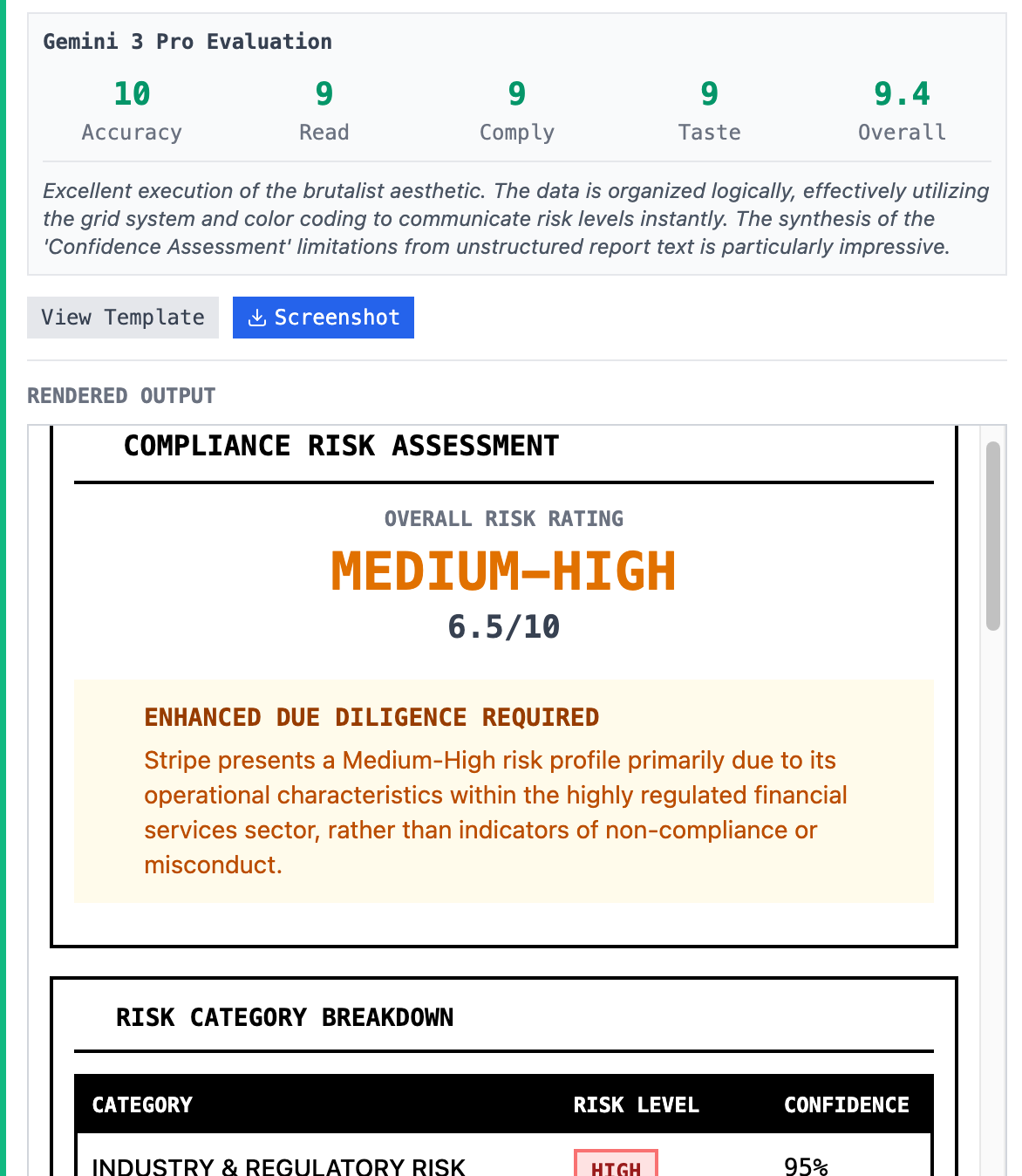
The second dimension of evaluations focuses on the visual aspect of Grep's panels. These panels display the research information using a very specific design system and panel classifications.
We evaluate these panels on:
- Accuracy - The information in the Markdown report and research needs to be accurately shown in the rich UI panels
- Compliance with design guidelines - Did it follow our design specifications from the skills and prompts? What we call "entry readability": Did it use readable components? Or did it use white on white backgrounds (not readable at all)? Any overlap on labels? Does spacing make sense?
- Taste - Taste is subjective, obviously, but we wanted to ensure the composition of the UI panels works. We use a combination of Opus and Gemini Pro 3 as visual LLMs for this.
This is probably a topic for a longer blog post.
Security
We obviously cannot expose all of Claude Code through an API endpoint. That would be a recipe for disaster.
We invest heavily in ensuring these sandboxes are as isolated as possible. They do not have access to any code or anything beyond the specific task the user is asking for. Just the allowed tools, skills, and MCPs we've configured for that agent.
We disallow all tools by default and have mechanisms of defense through the system prompt to ensure the agent stays in role. We also have alerting and notification when users are trying to brute force those mechanisms.
Using Agents to Build Agents
The power of Grep is that once a user is set on a kind of investigation, they don't have to do it from scratch. Users can ask as many follow-up questions as they want depending on the workflow, whether that's vendor onboarding, startup diligence, risk due diligence, or just customer discovery. Each workflow has a different set of questions you want to ask the agent.
For this, we developed templates.
Templates enable anyone to save a workflow they perform on a company as a chain of agents that can then perform the work. Say you need one agent that researches a business, and then you ask: estimate revenue, who are the team members, do they have any open source code, what are the main competitors, what is the market size? All of that research can be templated and saved, enabling you to run the entire research with one click.
Furthermore, just like in Parcha, we enable you to run as many of these as you need in parallel. If you have a hundred companies that you want to research, you can instantly go from asking a set of questions to launching potentially hundreds of agents in parallel to answer all of those questions about whatever body of entities you have.
This accelerates research and goes beyond automating what a human can do. Into what a whole operations team of very expensive consultants would do for you. Onboarding them takes just five minutes.
We do this reusing the same architecture we built for Parcha: configurations for agents that include prompts, tools, and code that we execute before and during the research. We use Temporal workflows or Celery chains to make it work.
In this case, we also use Claude Agents the same way. Claude in a Box enables us to run every one of these subsystems independently, but also enables us to rely on the main research first, forking into more information, and then running multiple sessions for every follow-up the customer may ask.
The templating also handles consistent UI generation, ensuring that for any custom questions where we don't have expertise, the user can both define and use whatever UI they need to display, in addition to the Markdown reports.
These use the same scaling principles we built for Parcha, where we have customers running tens of thousands of agents executing millions of LLM calls. Just with a click.
Reflections
As I've mentioned multiple times in previous blog posts, we use Claude Code extensively to build Parcha. So it's been very fun to build agents using Claude Code that themselves use Claude Code.
Watching these agents work and perform even the most difficult tasks we've thrown at them has been a joy.
There's still a lot of work to be done to simplify infrastructure and ensure the agents just work. But for now, what this shows is that the future of building agentic systems is bright, and full of opportunities.
Want to see Grep in action? Check out our research preview at grep.ai with access code GREPIT. Built by Parcha, where we build AI agents that automate KYB, AML screening, and due diligence for leading fintechs and financial institutions.